Pehle Basics — Index Hota Kya Hai?
Simple bhaasha mein — index ek kitaab ka index page hota hai.
Jaise tum dictionary mein "Zebra" dhundne ke liye seedha Z section pe jaate ho, poori dictionary page by page nahi padhte — waise hi SQL Server index use karke seedha sahi data pe jump karta hai.
Index nahi hoga toh SQL Server Full Table Scan karega — matlab poori table row by row padho. Agar table mein 50 lakh rows hain, toh sab kuch wahin ruk jaata hai.
Do main types hote hain:
Clustered Index — Table ki physical sorting. Ek table mein sirf ek hi ho sakta hai. Primary key usually yahi hota hai.
Non-Clustered Index — Alag se bana hua pointer — jaise book ke end mein subject index. Ek table pe multiple ho sakte hain.
Toh Problem Kya Hai? Jitne Zyada Index Utna Acha?
Yahi sochta hai ek naya developer. Aur yahi galti hai.
Index ek double-edged sword hai. Read queries fast karta hai — lekin har INSERT, UPDATE, DELETE pe SQL Server ko wo index bhi update karna padta hai. Matlab — zyada indexes = write operations slow.
Index Count | SELECT Speed | INSERT/UPDATE/DELETE | Reality |
|---|---|---|---|
0 indexes | Full scan — slow | Fast | OLTP ke liye disaster |
2–4 indexes | Fast | Manageable | Sweet spot |
10+ indexes | Fast reads | Bahut slow writes | Over-indexed table |
3 Problems Jo Har DBA Face Karta Hai
Problem 1 — Missing Indexes
Koi query slow chal rahi hai kyunki uske liye sahi index exist hi nahi karta. SQL Server khud ye track karta hai apne DMVs (Dynamic Management Views) mein. Wo keh raha hota hai — "bhai, agar tum yahan index banao toh mere 78% kaam aasaan ho jaata."
Source: sys.dm_db_missing_index_details, sys.dm_db_missing_index_group_stats
Problem 2 — Unused Indexes
Kai indexes ek purani query ke liye bane hote hain jo ab run hi nahi hoti. Wo index table par baith ke sirf write overhead badha raha hota hai. Koi read nahi karta — lekin har INSERT pe wo update hota rehta hai.
Source: sys.dm_db_index_usage_stats
Problem 3 — Duplicate Indexes
Alag alag developers ne alag alag time pe same columns pe indexes bana diye. Ab do indexes hain jo exact same kaam kar rahe hain — double overhead.
Galat Approach — Auto Drop/Create Production Mein
⚠️ Risk 1 — Server Restart Problem
dm_db_index_usage_stats server restart pe reset ho jaata hai. Agar aapka server 2 din pehle restart hua, toh ek heavily-used index bhi "unused" dikhega. Aur aapne drop kar diya? Game over.
⚠️ Risk 2 — Seasonal Queries
Month-end reports, year-end payroll processing, quarterly audit queries — ye saal mein sirf ek baar chalte hain. Baaki 11 months "unused" dikhenge. Galat time pe drop kiya = critical report fail.
⚠️ Risk 3 — Greedy Suggestions
SQL Server ka missing index suggestion sirf us ek query ke liye sochta hai jo abhi slow thi. Wo nahi jaanta ki koi existing index already partial cover kar raha hai, ya naya index bana ke write performance kitni girengi.
"Production database pe automatically index drop karna waise hi hai jaise bina mechanic se pooche apni gaadi ke parts nikalna — kyunki lagta tha woh use nahi ho raha."
Sahi Approach — 3 Phase DBA Workflow
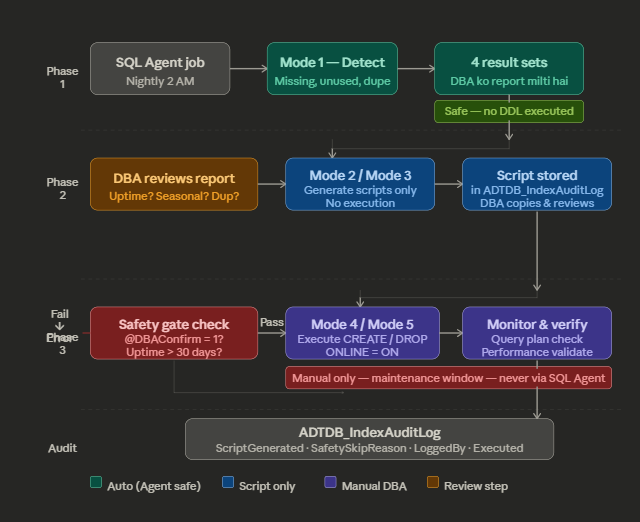
Real world mein bade organizations mein — banks, fintech, enterprise payroll systems — index changes ek proper process se guzarte hain:
IF NOT EXISTS (SELECT 1 FROM sys.tables WHERE name = 'ADTDB_IndexAuditLog')
BEGIN
    CREATE TABLE dbo.ADTDB_IndexAuditLog
    (
        Id INT IDENTITY(1,1) PRIMARY KEY,

        -- Index Info
        IndexType SMALLINT, -- 1- Missing / 2-Unused
        TableName NVARCHAR(255),
        IndexName NVARCHAR(255),

        -- Action Info
        ActionTaken SMALLINT, -- 1-Created / 2-Dropped / 3-Skipped
        ImprovementMeasure DECIMAL(10,2),

        -- Execution Tracking
        Executed BIT DEFAULT 0,
        ScriptGenerated NVARCHAR(MAX) NULL,
        SafetySkipReason NVARCHAR(500) NULL,

        -- Audit Info
        LoggedBy NVARCHAR(128)
            CONSTRAINT DF_ADTDB_IndexAuditLog_LoggedBy DEFAULT SUSER_SNAME(),
        DateLogged DATETIME
            CONSTRAINT DF_ADTDB_IndexAuditLog_DateLogged DEFAULT GETDATE()
    );
END
GO
/* ================================================================
Final table structure after ALTER:
----------------------------------------------------------------
Id INT IDENTITY PK -- original
IndexType SMALLINT -- original 1=Missing 2=Unused 3=Duplicate
TableName NVARCHAR(255) -- original
IndexName NVARCHAR(255) -- original
ActionTaken SMALLINT -- original 1=ScriptGenerated 2=Created 3=Dropped 4=Skipped 5=DetectedOnly
ImprovementMeasure FLOAT -- original
DateLogged DATETIME -- original
Executed BIT -- original
ScriptGenerated NVARCHAR(MAX) -- NEW: full DDL stored for DBA review
SafetySkipReason NVARCHAR(500) -- NEW: why index was skipped
LoggedBy NVARCHAR(128) -- NEW: which login ran the SP
================================================================ */
/* ================================================================
USAGE
================================================================
EXEC dbo.dbusp_IndexMaintenance @Mode = 1 -- Detect
EXEC dbo.dbusp_IndexMaintenance @Mode = 2 -- Gen CREATE scripts
EXEC dbo.dbusp_IndexMaintenance @Mode = 3 -- Gen DROP scripts
EXEC dbo.dbusp_IndexMaintenance @Mode = 4, @DBAConfirm = 1 -- Execute CREATE
EXEC dbo.dbusp_IndexMaintenance @Mode = 5, @DBAConfirm = 1 -- Execute DROP
-- Review generated scripts before executing:
SELECT * FROM dbo.ADTDB_IndexAuditLog
WHERE ActionTaken = 1 AND Executed = 0
ORDER BY DateLogged DESC;
================================================================ */
IF EXISTS (SELECT 1 FROM sys.procedures WHERE name = 'dbusp_IndexMaintenance')
DROP PROCEDURE dbo.dbusp_IndexMaintenance;
GO
SET ANSI_NULLS ON;
SET QUOTED_IDENTIFIER ON;
GO
CREATE PROCEDURE dbo.dbusp_IndexMaintenance
@Mode SMALLINT = 1,
@DBAConfirm BIT = 0,
@MinImprovementScore FLOAT = 1000,
@MaxIndexesPerTable INT = 5,
@MinUptimeDays INT = 30
AS
SET NOCOUNT ON;
BEGIN TRY
/* ── Runtime context ─────────────────────────────────── */
DECLARE @DBID INT = DB_ID();
DECLARE @DBName SYSNAME = DB_NAME();
DECLARE @RunBy NVARCHAR(128) = SUSER_SNAME();
DECLARE @RunTime DATETIME = GETDATE();
DECLARE @UptimeDays INT;
SELECT @UptimeDays = DATEDIFF(DAY, sqlserver_start_time, GETDATE())
FROM sys.dm_os_sys_info;
/* ── Working variables ───────────────────────────────── */
DECLARE @MinID INT = 0;
DECLARE @MaxID INT = 0;
DECLARE @Script NVARCHAR(MAX) = N'';
DECLARE @TableName NVARCHAR(255) = N'';
DECLARE @IndexName NVARCHAR(255) = N'';
DECLARE @IndexCount INT = 0;
DECLARE @Executed BIT = 0;
DECLARE @SkipReason NVARCHAR(500) = N'';
DECLARE @ImpScore FLOAT = 0;
/* ════════════════════════════════════════════════════════
SAFETY GATE
════════════════════════════════════════════════════ */
IF @Mode NOT IN (1,2,3,4,5)
BEGIN
RAISERROR('Invalid @Mode "%d". Valid: 1=Detect, 2=GenCreate, 3=GenDrop, 4=ExecCreate, 5=ExecDrop.', 16, 1, @Mode);
RETURN;
END
IF @Mode IN (4,5) AND @DBAConfirm <> 1
BEGIN
RAISERROR('Mode %d requires @DBAConfirm = 1. Review Mode 2/3 scripts first, then re-run with @DBAConfirm = 1.', 16, 1, @Mode);
RETURN;
END
IF @Mode = 5 AND @UptimeDays < @MinUptimeDays
BEGIN
RAISERROR('Server uptime is only %d day(s). Minimum %d days required before unused index data is reliable.', 16, 1, @UptimeDays, @MinUptimeDays);
RETURN;
END
/* ════════════════════════════════════════════════════════
TEMP TABLE — Missing Indexes
════════════════════════════════════════════════════ */
CREATE TABLE #Missing
(
ID INT IDENTITY PRIMARY KEY,
ObjectName NVARCHAR(255),
FullTableName NVARCHAR(255),
EqualityCols NVARCHAR(MAX),
InequalityCols NVARCHAR(MAX),
IncludedCols NVARCHAR(MAX),
ImprovementScore FLOAT,
UserSeeks BIGINT,
UserScans BIGINT,
AvgImpactPct FLOAT,
CreateScript NVARCHAR(MAX),
IndexName NVARCHAR(255),
ExistingNCCount INT DEFAULT 0,
SkipReason NVARCHAR(500)
);
INSERT INTO #Missing
(
ObjectName, FullTableName,
EqualityCols, InequalityCols, IncludedCols,
ImprovementScore, UserSeeks, UserScans, AvgImpactPct,
CreateScript, IndexName
)
SELECT
OBJECT_NAME(mid.object_id, mid.database_id),
mid.statement,
mid.equality_columns,
mid.inequality_columns,
mid.included_columns,
CAST(
migs.avg_total_user_cost
* migs.avg_user_impact
* (migs.user_seeks + migs.user_scans)
AS FLOAT),
migs.user_seeks,
migs.user_scans,
migs.avg_user_impact,
/* CREATE script with ONLINE=ON so production table stays accessible */
N'CREATE INDEX [uidx_'
+ OBJECT_NAME(mid.object_id, mid.database_id)
+ N'_'
+ REPLACE(REPLACE(REPLACE(ISNULL(mid.equality_columns, N''), N', ', N'_'), N'[', N''), N']', N'')
+ CASE WHEN mid.equality_columns IS NOT NULL AND mid.inequality_columns IS NOT NULL THEN N'_' ELSE N'' END
+ REPLACE(REPLACE(REPLACE(ISNULL(mid.inequality_columns, N''), N', ', N'_'), N'[', N''), N']', N'')
+ N'_' + LEFT(REPLACE(CAST(NEWID() AS NVARCHAR(36)), N'-', N''), 6)
+ N'] ON ' + mid.statement
+ N' (' + ISNULL(mid.equality_columns, N'')
+ CASE WHEN mid.equality_columns IS NOT NULL AND mid.inequality_columns IS NOT NULL THEN N',' ELSE N'' END
+ ISNULL(mid.inequality_columns, N'') + N')'
+ ISNULL(N' INCLUDE (' + mid.included_columns + N')', N'')
+ N' WITH (ONLINE = ON, FILLFACTOR = 85)',
N'[uidx_'
+ OBJECT_NAME(mid.object_id, mid.database_id)
+ N'_'
+ REPLACE(REPLACE(REPLACE(ISNULL(mid.equality_columns, N''), N', ', N'_'), N'[', N''), N']', N'')
+ CASE WHEN mid.equality_columns IS NOT NULL AND mid.inequality_columns IS NOT NULL THEN N'_' ELSE N'' END
+ REPLACE(REPLACE(REPLACE(ISNULL(mid.inequality_columns, N''), N', ', N'_'), N'[', N''), N']', N'')
+ N']'
FROM sys.dm_db_missing_index_group_stats migs
JOIN sys.dm_db_missing_index_groups mig ON migs.group_handle = mig.index_group_handle
JOIN sys.dm_db_missing_index_details mid ON mig.index_handle = mid.index_handle
WHERE mid.database_id = @DBID
AND migs.avg_total_user_cost * migs.avg_user_impact * (migs.user_seeks + migs.user_scans) > @MinImprovementScore
ORDER BY CAST(
migs.avg_total_user_cost
* migs.avg_user_impact
* (migs.user_seeks + migs.user_scans)
AS FLOAT) DESC;
/* Populate existing NC index count */
UPDATE m
SET m.ExistingNCCount = (
SELECT COUNT(*) FROM sys.indexes i
WHERE i.object_id = OBJECT_ID(m.FullTableName)
AND i.type_desc = 'NONCLUSTERED'
)
FROM #Missing m;
/* Set skip reasons */
UPDATE #Missing
SET SkipReason = 'Table already has ' + CAST(ExistingNCCount AS VARCHAR) + ' NC indexes (limit=' + CAST(@MaxIndexesPerTable AS VARCHAR) + ')'
WHERE ExistingNCCount >= @MaxIndexesPerTable;
UPDATE #Missing
SET SkipReason = ISNULL(SkipReason + ' | ', '') + 'Low impact (' + CAST(CAST(AvgImpactPct AS DECIMAL(5,1)) AS VARCHAR) + '%)'
WHERE AvgImpactPct < 30;
/* ════════════════════════════════════════════════════════
TEMP TABLE — Unused Indexes
════════════════════════════════════════════════════ */
CREATE TABLE #Unused
(
ID INT IDENTITY PRIMARY KEY,
TableName NVARCHAR(255),
IndexName NVARCHAR(255),
UserUpdates BIGINT,
SizeMB DECIMAL(10,2),
DropScript NVARCHAR(MAX)
);
IF @UptimeDays >= @MinUptimeDays
BEGIN
INSERT INTO #Unused (TableName, IndexName, UserUpdates, SizeMB, DropScript)
SELECT DISTINCT
QUOTENAME(OBJECT_SCHEMA_NAME(i.object_id)) + N'.' + QUOTENAME(OBJECT_NAME(i.object_id)),
i.name,
ISNULL(s.user_updates, 0),
CAST(SUM(p.used_page_count) OVER (PARTITION BY i.object_id, i.index_id) * 8.0 / 1024 AS DECIMAL(10,2)),
N'DROP INDEX ' + QUOTENAME(i.name)
+ N' ON ' + QUOTENAME(OBJECT_SCHEMA_NAME(i.object_id))
+ N'.' + QUOTENAME(OBJECT_NAME(i.object_id))
FROM sys.indexes i
LEFT JOIN sys.dm_db_index_usage_stats s
ON i.object_id = s.object_id AND i.index_id = s.index_id AND s.database_id = @DBID
LEFT JOIN sys.dm_db_partition_stats p
ON i.object_id = p.object_id AND i.index_id = p.index_id
WHERE
OBJECTPROPERTY(i.object_id, 'IsUserTable') = 1
AND i.is_primary_key = 0
AND i.is_unique = 0
AND i.type_desc = 'NONCLUSTERED'
AND ISNULL(s.user_seeks, 0) = 0
AND ISNULL(s.user_scans, 0) = 0
AND ISNULL(s.user_lookups, 0) = 0;
END
/* ════════════════════════════════════════════════════════
TEMP TABLE — Duplicate Indexes
════════════════════════════════════════════════════ */
CREATE TABLE #Duplicate
(
ID INT IDENTITY PRIMARY KEY,
TableName NVARCHAR(255),
DuplicateIndexName NVARCHAR(255),
KeptIndexName NVARCHAR(255),
Reason NVARCHAR(200),
DropScript NVARCHAR(MAX)
);
INSERT INTO #Duplicate (TableName, DuplicateIndexName, KeptIndexName, Reason, DropScript)
SELECT
QUOTENAME(OBJECT_SCHEMA_NAME(i1.object_id)) + N'.' + QUOTENAME(OBJECT_NAME(i1.object_id)),
i1.name,
i2.name,
N'Same leading column as ' + i2.name,
N'DROP INDEX ' + QUOTENAME(i1.name)
+ N' ON ' + QUOTENAME(OBJECT_SCHEMA_NAME(i1.object_id))
+ N'.' + QUOTENAME(OBJECT_NAME(i1.object_id))
FROM sys.indexes i1
JOIN sys.indexes i2 ON i1.object_id = i2.object_id AND i1.index_id <> i2.index_id
JOIN sys.index_columns ic1 ON ic1.object_id = i1.object_id AND ic1.index_id = i1.index_id AND ic1.key_ordinal = 1
JOIN sys.index_columns ic2 ON ic2.object_id = i2.object_id AND ic2.index_id = i2.index_id AND ic2.key_ordinal = 1
WHERE
i1.type_desc = 'NONCLUSTERED' AND i2.type_desc = 'NONCLUSTERED'
AND ic1.column_id = ic2.column_id
AND i1.index_id > i2.index_id
AND OBJECTPROPERTY(i1.object_id, 'IsUserTable') = 1;
/* ════════════════════════════════════════════════════════
MODE 1 — DETECT + REPORT (no DDL)
════════════════════════════════════════════════════ */
IF @Mode = 1
BEGIN
/* Summary */
SELECT
@DBName AS DatabaseName,
@UptimeDays AS ServerUptimeDays,
CASE WHEN @UptimeDays < @MinUptimeDays
THEN 'WARNING: Uptime < ' + CAST(@MinUptimeDays AS VARCHAR) + ' days — unused index data unreliable'
ELSE 'OK'
END AS UptimeStatus,
(SELECT COUNT(*) FROM #Missing WHERE SkipReason IS NULL) AS MissingIndexes_ActionNeeded,
(SELECT COUNT(*) FROM #Missing WHERE SkipReason IS NOT NULL) AS MissingIndexes_Skipped,
(SELECT COUNT(*) FROM #Unused) AS UnusedIndexes,
(SELECT COUNT(*) FROM #Duplicate) AS DuplicateIndexes,
@RunBy AS RunBy,
@RunTime AS RunTime;
/* Missing indexes */
SELECT
m.ObjectName AS [Table],
m.EqualityCols AS [Equality cols],
m.InequalityCols AS [Inequality cols],
m.IncludedCols AS [Include cols],
CAST(m.ImprovementScore AS DECIMAL(18,0)) AS [Improvement score],
CAST(m.AvgImpactPct AS DECIMAL(5,1)) AS [Avg impact %],
m.UserSeeks AS [Seeks],
m.UserScans AS [Scans],
m.ExistingNCCount AS [Existing NC indexes],
ISNULL(m.SkipReason, 'Recommended') AS [Status],
m.CreateScript AS [Suggested script]
FROM #Missing m
ORDER BY m.ImprovementScore DESC;
/* Unused indexes */
IF @UptimeDays >= @MinUptimeDays
SELECT
u.TableName,
u.IndexName,
u.UserUpdates AS [Write ops (overhead)],
u.SizeMB AS [Size MB],
CASE WHEN u.UserUpdates > 1000 THEN 'Caution: high writes' ELSE 'Review for drop' END AS [DBA note],
u.DropScript AS [Drop script]
FROM #Unused u ORDER BY u.SizeMB DESC;
ELSE
SELECT 'Uptime only ' + CAST(@UptimeDays AS VARCHAR) + ' days — unused detection skipped' AS Warning;
/* Duplicate indexes */
SELECT
d.TableName,
d.DuplicateIndexName AS [Remove this],
d.KeptIndexName AS [Keep this],
d.Reason,
d.DropScript
FROM #Duplicate d ORDER BY d.TableName;
/* Log detect run — ActionTaken=5 (DetectedOnly), Executed=0 */
INSERT INTO dbo.ADTDB_IndexAuditLog
(IndexType, TableName, IndexName, ActionTaken, ImprovementMeasure, DateLogged, Executed, ScriptGenerated, SafetySkipReason, LoggedBy)
SELECT
1,
FullTableName,
IndexName,
5, -- DetectedOnly
ImprovementScore,
@RunTime,
0,
NULL,
ISNULL(SkipReason, NULL),
@RunBy
FROM #Missing;
GOTO Cleanup;
END
/* ════════════════════════════════════════════════════════
MODE 2 — GENERATE CREATE SCRIPTS (no execution)
════════════════════════════════════════════════════ */
IF @Mode = 2
BEGIN
SELECT @MinID = MIN(ID), @MaxID = MAX(ID) FROM #Missing;
WHILE @MinID <= @MaxID
BEGIN
SELECT
@TableName = FullTableName,
@Script = CreateScript,
@IndexName = IndexName,
@SkipReason = ISNULL(SkipReason, N''),
@ImpScore = ImprovementScore
FROM #Missing WHERE ID = @MinID;
INSERT INTO dbo.ADTDB_IndexAuditLog
(IndexType, TableName, IndexName, ActionTaken, ImprovementMeasure, DateLogged, Executed, ScriptGenerated, SafetySkipReason, LoggedBy)
VALUES
(
1,
@TableName,
@IndexName,
CASE WHEN @SkipReason = N'' THEN 1 ELSE 4 END, -- 1=ScriptGenerated / 4=Skipped
@ImpScore,
@RunTime,
0,
CASE WHEN @SkipReason = N'' THEN @Script ELSE NULL END,
NULLIF(@SkipReason, N''),
@RunBy
);
SET @MinID += 1;
END
SELECT
m.ObjectName AS [Table],
CAST(m.ImprovementScore AS DECIMAL(18,0)) AS [Score],
CAST(m.AvgImpactPct AS DECIMAL(5,1)) AS [Impact %],
ISNULL(m.SkipReason, 'Script generated') AS [Status],
m.CreateScript AS [Script — review then run Mode 4]
FROM #Missing m ORDER BY m.ImprovementScore DESC;
GOTO Cleanup;
END
/* ════════════════════════════════════════════════════════
MODE 3 — GENERATE DROP SCRIPTS (no execution)
════════════════════════════════════════════════════ */
IF @Mode = 3
BEGIN
IF @UptimeDays < @MinUptimeDays
SELECT 'WARNING: Uptime only ' + CAST(@UptimeDays AS VARCHAR) + ' days — scripts generated but do NOT run until uptime > ' + CAST(@MinUptimeDays AS VARCHAR) + ' days' AS Warning;
SELECT @MinID = MIN(ID), @MaxID = MAX(ID) FROM #Unused;
WHILE @MinID <= @MaxID
BEGIN
SELECT
@TableName = TableName,
@Script = DropScript,
@IndexName = IndexName
FROM #Unused WHERE ID = @MinID;
INSERT INTO dbo.ADTDB_IndexAuditLog
(IndexType, TableName, IndexName, ActionTaken, ImprovementMeasure, DateLogged, Executed, ScriptGenerated, SafetySkipReason, LoggedBy)
VALUES
(
2,
@TableName,
@IndexName,
1, -- ScriptGenerated
0,
@RunTime,
0,
@Script,
CASE WHEN @UptimeDays < @MinUptimeDays
THEN 'Uptime only ' + CAST(@UptimeDays AS VARCHAR) + ' days — unsafe to execute yet'
ELSE NULL
END,
@RunBy
);
SET @MinID += 1;
END
SELECT
u.TableName,
u.IndexName,
u.SizeMB AS [Size MB freed],
u.UserUpdates AS [Write ops removed],
CASE WHEN u.UserUpdates > 1000 THEN 'Caution: high writes' ELSE 'Looks safe' END AS [DBA note],
u.DropScript AS [Script — review then run Mode 5]
FROM #Unused u ORDER BY u.SizeMB DESC;
GOTO Cleanup;
END
/* ════════════════════════════════════════════════════════
MODE 4 — EXECUTE CREATE (@DBAConfirm = 1 required)
════════════════════════════════════════════════════ */
IF @Mode = 4
BEGIN
SELECT @MinID = MIN(ID), @MaxID = MAX(ID) FROM #Missing;
WHILE @MinID <= @MaxID
BEGIN
SELECT
@TableName = FullTableName,
@Script = CreateScript,
@IndexName = IndexName,
@SkipReason = ISNULL(SkipReason, N''),
@ImpScore = ImprovementScore
FROM #Missing WHERE ID = @MinID;
IF @SkipReason <> N''
BEGIN
INSERT INTO dbo.ADTDB_IndexAuditLog
(IndexType, TableName, IndexName, ActionTaken, ImprovementMeasure, DateLogged, Executed, ScriptGenerated, SafetySkipReason, LoggedBy)
VALUES (1, @TableName, @IndexName, 4, @ImpScore, @RunTime, 0, @Script, @SkipReason, @RunBy);
END
ELSE
BEGIN
SET @Executed = 0;
BEGIN TRY
EXEC (@Script);
SET @Executed = 1;
END TRY
BEGIN CATCH
INSERT INTO dbo.ADTDB_IndexAuditLog
(IndexType, TableName, IndexName, ActionTaken, ImprovementMeasure, DateLogged, Executed, ScriptGenerated, SafetySkipReason, LoggedBy)
VALUES (1, @TableName, @IndexName, 4, @ImpScore, @RunTime, 0, @Script, 'FAILED: ' + ERROR_MESSAGE(), @RunBy);
SET @MinID += 1;
CONTINUE;
END CATCH;
INSERT INTO dbo.ADTDB_IndexAuditLog
(IndexType, TableName, IndexName, ActionTaken, ImprovementMeasure, DateLogged, Executed, ScriptGenerated, SafetySkipReason, LoggedBy)
VALUES (1, @TableName, @IndexName, 2, @ImpScore, @RunTime, @Executed, @Script, NULL, @RunBy);
END
SET @MinID += 1;
END
SELECT IndexName, TableName,
CASE ActionTaken WHEN 2 THEN 'Created' WHEN 4 THEN 'Skipped/Failed' END AS Result,
Executed, SafetySkipReason AS Reason, DateLogged
FROM dbo.ADTDB_IndexAuditLog
WHERE DateLogged >= DATEADD(MINUTE, -5, GETDATE()) AND IndexType = 1
ORDER BY DateLogged DESC;
GOTO Cleanup;
END
/* ════════════════════════════════════════════════════════
MODE 5 — EXECUTE DROP (@DBAConfirm = 1 required)
Uptime gate enforced above
════════════════════════════════════════════════════ */
IF @Mode = 5
BEGIN
SELECT @MinID = MIN(ID), @MaxID = MAX(ID) FROM #Unused;
WHILE @MinID <= @MaxID
BEGIN
SELECT
@TableName = TableName,
@Script = DropScript,
@IndexName = IndexName
FROM #Unused WHERE ID = @MinID;
SET @Executed = 0;
BEGIN TRY
EXEC (@Script);
SET @Executed = 1;
END TRY
BEGIN CATCH
INSERT INTO dbo.ADTDB_IndexAuditLog
(IndexType, TableName, IndexName, ActionTaken, ImprovementMeasure, DateLogged, Executed, ScriptGenerated, SafetySkipReason, LoggedBy)
VALUES (2, @TableName, @IndexName, 4, 0, @RunTime, 0, @Script, 'FAILED: ' + ERROR_MESSAGE(), @RunBy);
SET @MinID += 1;
CONTINUE;
END CATCH;
INSERT INTO dbo.ADTDB_IndexAuditLog
(IndexType, TableName, IndexName, ActionTaken, ImprovementMeasure, DateLogged, Executed, ScriptGenerated, SafetySkipReason, LoggedBy)
VALUES (2, @TableName, @IndexName, 3, 0, @RunTime, @Executed, @Script, NULL, @RunBy);
SET @MinID += 1;
END
SELECT IndexName, TableName,
CASE ActionTaken WHEN 3 THEN 'Dropped' WHEN 4 THEN 'Failed' END AS Result,
Executed, SafetySkipReason AS Reason, DateLogged
FROM dbo.ADTDB_IndexAuditLog
WHERE DateLogged >= DATEADD(MINUTE, -5, GETDATE()) AND IndexType = 2
ORDER BY DateLogged DESC;
GOTO Cleanup;
END
/* ════════════════════════════════════════════════════════
CLEANUP
════════════════════════════════════════════════════ */
Cleanup:
DELETE FROM dbo.ADTDB_IndexAuditLog WHERE DATEDIFF(DAY, DateLogged, GETDATE()) > 90;
IF OBJECT_ID('tempdb..#Missing') IS NOT NULL DROP TABLE #Missing;
IF OBJECT_ID('tempdb..#Unused') IS NOT NULL DROP TABLE #Unused;
IF OBJECT_ID('tempdb..#Duplicate') IS NOT NULL DROP TABLE #Duplicate;
END TRY
BEGIN CATCH
IF OBJECT_ID('tempdb..#Missing') IS NOT NULL DROP TABLE #Missing;
IF OBJECT_ID('tempdb..#Unused') IS NOT NULL DROP TABLE #Unused;
IF OBJECT_ID('tempdb..#Duplicate') IS NOT NULL DROP TABLE #Duplicate;
EXECUTE usp_ErrorDB_AddNew;
SELECT 3 AS ErrorCode, 'dbusp_IndexMaintenance failed' AS Message,
ERROR_MESSAGE() AS Detail, ERROR_LINE() AS [Line];
END CATCH
GOPhase 1 — Detect (Automated, Safe)
SP sirf detect kare aur report kare. Koi DDL nahi chalana. SQL Agent se roz raat chalao. Missing indexes ki list, unused ki list, duplicates — sab ek clean result set mein DBA ke paas aaye.
-- Roz raat 2 baje SQL Agent se chalao — bilkul safe hai
EXEC dbo.dbusp_IndexMaintenance @Mode = 1;
Mode 1 se 4 result sets milte hain:
Summary — uptime status, count of issues
Missing indexes with improvement score
Unused indexes with size aur write overhead
Duplicate indexes
Phase 2 — Review + Script Generate (DBA Manually)
Har suggestion pe DBA khud sooche:
Kya ye existing index se better hai?
Table pe write load kaisi hai?
Kab last restart hua? (
dm_db_index_usage_statstab se reset hai)Seasonal query toh nahi?
Duplicate hai kya?
Phir SP scripts generate kare aur AuditLog mein store kare:
-- CREATE scripts generate karo — kuch execute nahi hoga
EXEC dbo.dbusp_IndexMaintenance @Mode = 2;

-- DROP scripts generate karo — kuch execute nahi hoga
EXEC dbo.dbusp_IndexMaintenance @Mode = 3;
DBA phir AuditLog se scripts review kare:
SELECT IndexName, TableName, ScriptGenerated, SafetySkipReason
FROM dbo.ADTDB_IndexAuditLog
WHERE ActionTaken = 1   -- ScriptGenerated
  AND Executed = 0
ORDER BY DateLogged DESC;
Phase 3 — Execute (Manual, Maintenance Window Mein)
Review ke baad, off-peak hours mein, DBA manually @DBAConfirm = 1 pass karke chalaye. Ek ek index. Monitor karo. Rollback plan ready rakho.
-- @DBAConfirm = 1 pass karna zaroori hai — safety gate
EXEC dbo.dbusp_IndexMaintenance @Mode = 4, @DBAConfirm = 1; -- CREATE
EXEC dbo.dbusp_IndexMaintenance @Mode = 5, @DBAConfirm = 1; -- DROP
Mode 4 aur Mode 5 kabhi SQL Agent se mat chalao. Sirf DBA manually chalaye.
SP Ka Final Design — 5 Modes
Mode | Kya karta hai | Agent se chalao? | @DBAConfirm chahiye? |
|---|---|---|---|
Mode 1 | Detect + Report (4 result sets) | Haan | Nahi |
Mode 2 | CREATE scripts generate | Haan | Nahi |
Mode 3 | DROP scripts generate | Scripts only | Nahi |
Mode 4 | Actually CREATE karo | Nahi | Zaroori |
Mode 5 | Actually DROP karo | Nahi | Zaroori |
Mode 5 mein ek extra safety layer — uptime check:
-- Server restart ke baad kitne din hue?
SELECT @UptimeDays = DATEDIFF(DAY, sqlserver_start_time, GETDATE())
FROM sys.dm_os_sys_info;

-- 30 din se kam = drop karna unsafe
IF @UptimeDays < @MinUptimeDays
    RAISERROR('Uptime sirf %d din — usage stats reliable nahi hain.', 16, 1, @UptimeDays);
Woh EXEC Wala Bug — Jo Sab Miss Karte Hain
Ye ek classic SQL Server gotcha hai:
-- ❌ WRONG — ye dynamic SQL nahi chalata
-- SQL Server variable ko stored proc naam samjhega
EXEC @IndexScript

-- ✅ CORRECT — parentheses zaroori hain dynamic SQL ke liye
EXEC (@IndexScript)
ONLINE = ON — Production Ka Golden Rule
Jab bhi production pe index create karo, ONLINE = ON use karo. Bina iske SQL Server table pe schema lock le leta hai — koi bhi query us table ko access nahi kar sakti us dauran.
-- ❌ Bina ONLINE — table lock ho jaayegi create ke dauran
CREATE INDEX [idx_Employee_Dept]
ON dbo.Employee (DepartmentId)

-- ✅ ONLINE = ON — users unaffected rehenge
CREATE INDEX [idx_Employee_Dept]
ON dbo.Employee (DepartmentId)
WITH (ONLINE = ON, FILLFACTOR = 85)
Note:
ONLINE = ONsirf SQL Server Enterprise ya Developer edition mein available hai. Standard edition mein ye option nahi hota — toh Standard pe maintenance window carefully choose karo.
AuditLog — Sab Kuch Track Karo
Ek acha DBA hamesha audit trail rakhta hai. ADTDB_IndexAuditLog table mein 3 important columns hain jo humne add kiye:
Column | Type | Kyu Zaroori |
|---|---|---|
| NVARCHAR(MAX) | Pura DDL store hoga — DBA baad mein review kare, copy kare |
| NVARCHAR(500) | Kyun skip hua — table limit, low impact, uptime issue, ya EXEC fail |
| NVARCHAR(128) | Kaun login tha — accountability ke liye |
Key Takeaways
1. Auto-drop production mein kabhi nahi dm_db_index_usage_stats restart pe reset hota hai. Seasonal queries saal mein ek baar chalti hain. Human review zaroori hai.
2. EXEC (@script) — parentheses mat bhuolo Dynamic SQL ke liye EXEC (@variable) zaroori hai. EXEC @variable silently fail karta hai ya galat SP call karta hai.
3. Script pehle, execute baad mein SP pehle script generate kare, AuditLog mein store kare, DBA review kare — tab execute. Ye extra step kaafi incidents bachata hai.
4. user_updates bhi dekho unused index pe Ek index reads mein zero ho lekin writes mein high — matlab drop karne se write overhead toh hatega lekin carefully decide karo.
5. ONLINE = ON — production ka golden rule Bina is option ke index create karne se table lock ho jaati hai. Enterprise edition hai toh hamesha use karo.